
Making a PHFUN Deposit is the essential first step to unlocking real-money gaming, thrilling slot jackpots, and immersive live dealer action on the platform. To provide maximum convenience for Filipino players, PHFUN features a modern, lightning-fast, and highly encrypted financial system. Whether you prefer funding your account through popular e-wallets like GCash and Maya, local bank transfers, or cryptocurrency (USDT), this comprehensive tutorial guides you through each method to ensure your funds arrive instantly and securely.
Supported PHFUN Deposit Methods and Channels
PHFUN prioritizes player convenience, transaction speed, and fund safety. The platform integrates widely trusted domestic and international payment gateways, ensuring that every PHFUN Deposit is processed seamlessly according to international banking security standards. Here is an overview of the main payment channels available:

- Local Bank Transfer: Direct online transfers via major Philippine banks such as BDO, BPI, Metrobank, UnionBank, and Landbank. Ideal for medium to large deposits with robust financial security.
- E-Wallets (GCash, Maya, GrabPay): The most popular and convenient payment method in the Philippines. Transactions are completed in seconds via QR code scanning or direct app redirection with zero hassle.
- Cryptocurrency (USDT): Dedicated to players seeking absolute privacy, high transaction limits, and rapid blockchain verification across TRC-20 and ERC-20 networks with no banking hour restrictions.
Guide to Complete PHFUN Deposit via Online Banking
Online bank transfer remains a top choice for players who prefer traditional banking channels and high-limit transactions. Follow these 5 clear steps to execute a bank transfer smoothly:
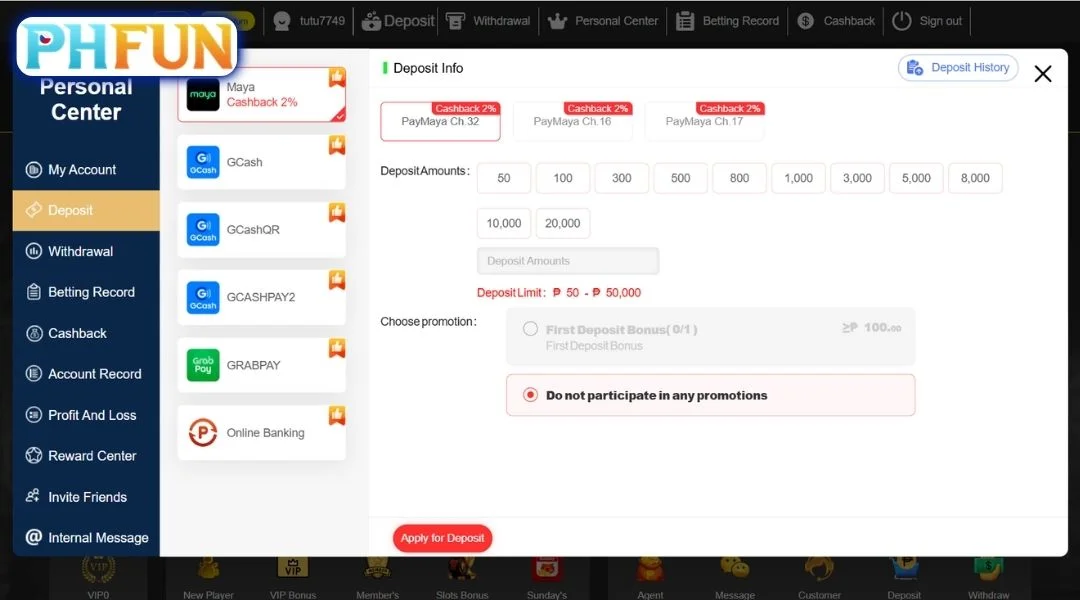
Step 1: Log In and Open the Deposit Cashier
Log in to your PHFUN account using your registered credentials. On the top navigation bar of the homepage or user profile menu, click the Deposit button to access the financial cashier portal.
Step 2: Select “Bank Transfer” Channel
From the list of available payment options, click on Bank Transfer. Choose your designated local banking institution from the supported list to view the corresponding transaction limits and terms.
Step 3: Enter the Desired PHP Deposit Amount
Input the amount of Philippine Pesos (PHP) you wish to transfer. Double-check that your amount falls within the channel’s allowed minimum and maximum deposit limits. Click “Proceed” to generate the system’s official receiving bank account details and unique transaction reference note.
Step 4: Execute the Transfer in Your Banking App
Open your mobile banking app (e.g., BDO Pay, BPI Online, UnionBank app) and send the exact PHP amount via InstaPay or PESONet to the recipient details provided by PHFUN. Make sure the sender’s bank account name matches your registered PHFUN account name 100% to ensure instant automated verification.
Step 5: Confirm and Upload Proof of Transfer
Save the transfer receipt or take a clear screenshot showing the transaction reference number. Return to the PHFUN Deposit page, input the reference code, and submit the order. Your funds will be automatically reconciled and credited to your betting balance within 1 to 5 minutes.
Depositing via E-Wallets (GCash / Maya) and USDT Crypto
For players looking for instant crediting without entering bank account details, e-wallets and cryptocurrency provide the fastest, most flexible deposit solutions on the platform.
Method 1: Instant Deposit via GCash & Maya E-Wallets
E-wallets are the preferred transaction method in the Philippines due to their 24/7 availability and zero waiting time. Follow these steps:
- Step 1: Navigate to the PHFUN Deposit section and select either GCash or Maya as your payment channel.
- Step 2: Choose or enter your desired PHP deposit amount, then click “Submit” to generate a dynamic payment QR code or payment gateway link.
- Step 3: Open your GCash or Maya mobile application, scan the generated QR code or log in through the secure payment gateway, and verify the payment with your MPIN / OTP.
- Step 4: Once the transfer is authorized in your e-wallet, the transaction completes automatically, and your PHFUN game balance updates instantly.
Method 2: Secure Deposit via USDT Cryptocurrency
Depositing with Tether (USDT) offers maximum anonymity, higher deposit ceilings, and protection against local banking downtime. Here is how to complete a crypto deposit:
- Step 1: In the cashier interface, select USDT and pick your preferred network protocol (TRC-20 is strongly recommended for ultra-low transaction fees and fast block times).
- Step 2: The system will generate a unique USDT deposit address and matching QR code. Copy the wallet address accurately or scan the QR code directly from your crypto wallet (Binance, Bybit, Trust Wallet, OKX).
- Step 3: Send the corresponding USDT amount from your wallet. The system automatically converts USDT into PHP in your game wallet using the real-time exchange rate.
- Step 4: Once the blockchain network records the necessary block confirmations (typically within 1–3 minutes), the PHP funds will appear in your PHFUN balance automatically.
Crucial Rules and Precautions for a Smooth PHFUN Deposit
To avoid delayed credits, transaction errors, or account flags, keep these essential deposit guidelines in mind every time you fund your balance:
- Strict Name Consistency: The account name on your funding bank or e-wallet (GCash/Maya) must match the legal name registered on your PHFUN account. Third-party deposits are strictly prohibited under anti-money laundering regulations and will result in deposit rejection.
- Always Generate Fresh Payment Details: Never send funds to previous bank account numbers or expired QR codes saved on your phone. PHFUN dynamically updates receiving accounts for security; always generate a new deposit order on the website before every transfer.
- Always Save Transaction Receipts: Always take a screenshot of your successful transfer slip containing the timestamp, exact amount, and reference number. This serves as vital proof in case manual reconciliation is ever required.
- Respect Channel Limits: Verify the minimum and maximum PHP limits for each channel before initiating a transfer to prevent failed transactions.
- Claim Welcome Bonuses Before Transferring: Check the PHFUN promotions page to select available first-deposit match promotions, slot bonuses, or rebate packages before completing your payment to maximize your free playing capital.
What to Do If Your PHFUN Deposit Is Delayed
In rare instances where your bank account has been debited but your PHFUN balance has not updated within 5–10 minutes, follow these simple troubleshooting steps to resolve the issue quickly:
- Step 1: Check Banking Status: Confirm that your bank or e-wallet app has marked the transfer as “Successful” and has deducted the correct PHP amount.
- Step 2: Refresh Your Game Lobby: Refresh your browser page or re-log in to the PHFUN mobile app to update your cached balance.
- Step 3: Contact 24/7 Live Customer Support: If the funds still do not appear, open the 24/7 Live Chat on the website. Provide the support agent with your username, deposit amount, transfer time, and a screenshot of the transaction receipt. Customer service will verify the transaction ID and manually credit your balance immediately.
Conclusion
Executing a PHFUN Deposit is a fast, seamless, and completely secure process designed to give players immediate access to the best online casino and slot entertainment in the Philippines. With flexible options including GCash, Maya, local bank transfers, and USDT, funding your account takes only a few simple steps. Make your deposit on PHFUN today, claim your exclusive deposit bonus, and enjoy a premium gaming experience with absolute confidence!